Asklet demo · 2:46
Watch how to add a feedback survey to your website
This short demo shows how to add a feedback survey to your website with Asklet. One snippet covers the whole site, and each section of it can ask its own question.
Step by step: add a feedback survey to your website
- 01
Create your free account
Sign up with your email or with Google. Asklet sets up an organisation on the Free plan with a first workspace, and the dashboard opens with a "Get started" checklist. You don't need a card.
- 02
Build your surveys
Start from a template or pick questions from the question bank. The video makes "Brew guide feedback" from the Article feedback template (a one-tap Yes / No, then what stood out, then an optional comment) and a site-wide NPS survey, then activates both. The preview shows each question as readers will see it.
- 03
Add your website
Enter the website's name and root domain, and pick a default survey. The default survey shows on every page that doesn't have a survey of its own, so the site asks something from the moment the snippet goes in.
- 04
Install the snippet
Copy the website snippet, a single iframe, and paste it once into the template your pages share, usually after the article body. You don't paste a new snippet for each page: the widget reads the address the reader is on and shows the right survey.
- 05
Give a section its own survey
On the Pages tab, add a page with a path pattern such as /brew-guides/*, choose its survey and a widget title, then go live. "Test an address" tells you which survey any path gets. In the video, the brew guides ask "Was this article useful?" while the home page asks the NPS question.
- 06
Read your results
The dashboard adds up responses and the "found it useful" score across your websites. Each website has sitewide results with the weekly trend, the NPS score for pages without their own survey, and every comment next to the page it came from. Open a page to see its own results, question by question.
Prefer to read? The quick start guide covers the same steps.
Different surveys on different pages
The snippet is the same on every page. When it loads, Asklet matches the page's path against the pages you've added and shows that page's survey. Nothing else on your site has to change.
- An exact path like /about matches only that page.
- An asterisk stands for one part of the path: /brew-guides/* covers every guide, including the ones you publish next month.
- A double asterisk at the end covers everything below a folder, so /blog/** takes in the whole blog.
- When two pages match, the more specific one wins, and every page you haven't added uses the website's default survey.
More examples in pages and path patterns, and ideas for where to put the widget in widget placement ideas.
Embed the feedback widget on any website
The website feedback widget is a plain iframe, so it works wherever you can paste HTML: a theme template, a custom HTML block or a component. There are step-by-step guides for each platform.
What your readers see
Readers get one short question at the end of the page and answer it with a tap, without signing in.
- No cookies, no tracking identifiers and no fingerprinting in the widget.
- Answers are anonymous. Emails and phone numbers are removed from comments before they are saved.
- A reader who has answered on a page isn't asked again there.
See plans and pricing for what each plan includes.
Next: make the widget look like your site
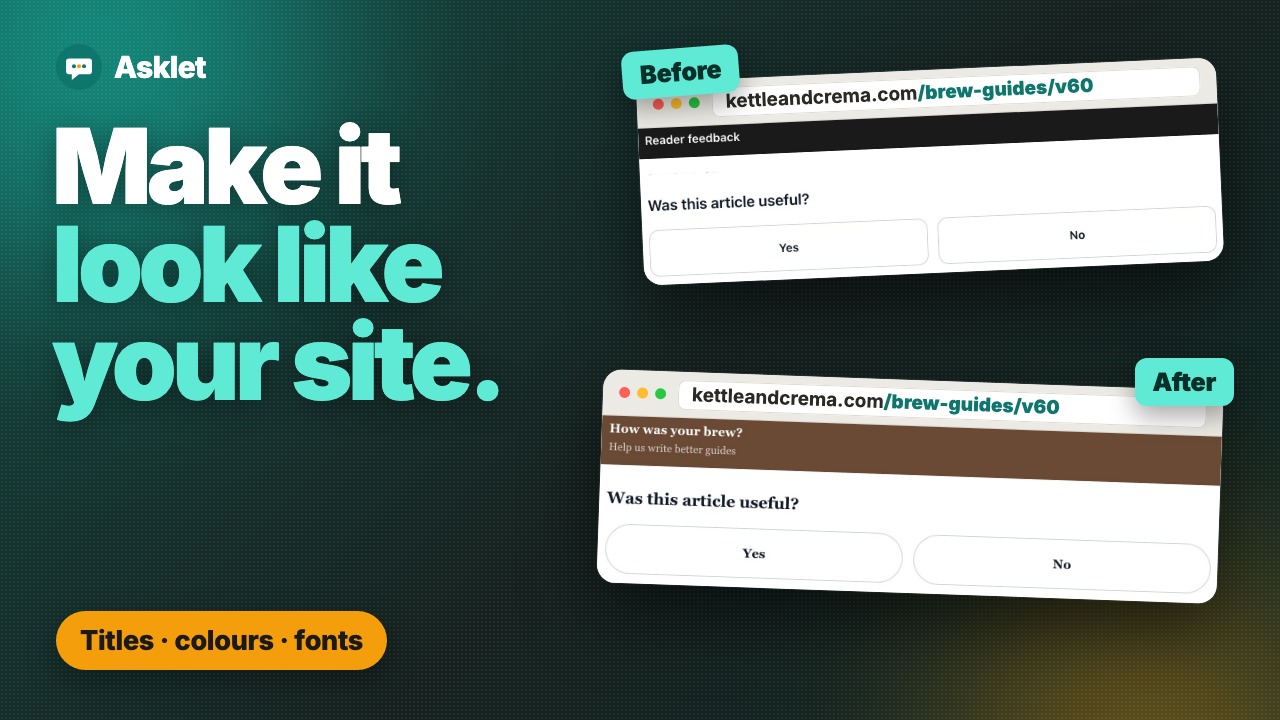 Video demo · 1:14 Make the feedback widget look like your site Your heading, brand colours, font and corners, live on the site after a refresh.
 Common questions
How do I add a feedback survey to my website?
Create a survey, add your website in Asklet, then paste one iframe snippet into the template your pages share. The widget shows your survey on every page. The video above walks through it in under three minutes, and the quick start guide has the same steps in writing.
Can I show different surveys on different pages?
Yes. Add a page with an exact path or a pattern, such as /blog/** for a whole section, and choose its survey. The most specific match wins and every other page uses the website's default survey. You keep the same single snippet.
Do I need a developer to embed the survey on my website?
No. If you can paste HTML into your theme or a custom HTML block, you can install it. There are guides for WordPress, Ghost, beehiiv, Webflow, Framer, and React, Vue and Svelte.
Does the feedback widget use cookies?
No. The widget uses no cookies, tracking identifiers or fingerprinting, and readers answer without signing in, so it adds nothing to your cookie banner.
Is Asklet free?
There is a Free plan, forever, with no card needed: 1 website, 10 live pages per website, 2 active surveys with up to 3 questions each, and 100 responses per month. Paid plans raise those limits.
Are the results in the video real?
The setup is the real product, filmed step by step. The coffee blog is a demo site, and the answers on the results screens were added for the demo, so treat the numbers as an example.
Get your first answers today.
Set-up takes a few minutes, and the free plan covers one website or app.
Start freeFree plan, no card needed.