Website feedback button
A feedback button and side tab for your website
A "Feedback" tab on the edge of the screen lets visitors tell you what they think without anything covering the page. Asklet gives you the survey, copy-paste code for a side tab, a floating button or a slide-in, and the answers for each page.
Reader feedback
This is the real widget - try it. Nothing is sent from this page.
How it works with Asklet
-
Create a short survey
Start from a template such as Article feedback or NPS, or build one from the question bank. One quick question and an optional comment is enough.
-
Paste the side tab code
Copy the side tab, floating button or slide-in code from the widget ideas page, put in your website snippet and paste it into your site template. The form only loads when someone opens it.
-
Read the answers per page
Each answer keeps the path of the page it came from. You see which pages people praise and which ones they complain about, with the comments next to the numbers.
Where a feedback tab works
One snippet covers the whole site. Use path patterns to ask different questions in different sections.
News and blog articles
Readers who have something to say about a story can say it without a form in the middle of the text. On long reads, a slide-in at the end asks at the right moment.
Read the use caseDocs and help centres
A side tab on every help page catches "this didn't answer my question" before it turns into a support ticket.
Read the use caseWeb apps and dashboards
A tab on the edge stays clear of your interface and lets users tell you what is confusing on the screen they are on.
Read the use caseLanding and pricing pages
Ask visitors what is stopping them from signing up. A corner button suits short pages.
Read the use caseThe whole site
Give the website a default survey and every page without its own survey shows it. New pages are covered as soon as they go live.
Questions to put behind the tab
People who click a feedback tab chose to answer, so make the first question quick and leave room to explain.
- Did you find what you were looking for? Yes / No Any page
- What is your feedback about? Single choice Content, a bug, an idea
- How easy was this page to use? Star rating Product and app screens
- Was this article helpful? Yes / No Articles and docs
- Is anything stopping you from signing up today? Free text Pricing and landing pages
- How likely are you to recommend us? NPS Whole site
- Anything else you want to tell us? Free text End of the survey
Side tab, floating button or slide-in
All of them show the same survey from the same snippet. Only the few lines of HTML around it change, so you can switch later without touching your surveys.
- Side tab: a vertical "Feedback" label on the right edge that slides a drawer out. Best when chat or cookie banners already use the corners
- Floating button: a "Feedback" button in the bottom-right corner, like a chat launcher. Best on landing and product pages
- Slide-in: a card that appears once the reader reaches the end of the article, when they can judge it
- Inline: the widget at the end of the page, with no button at all. Best for articles and docs
Answers grouped by page
A feedback tab on every page only helps if you can tell the pages apart. Each answer is stored with its path, and a pattern such as /docs/** adds up a whole section while still listing the pages the answers came from.
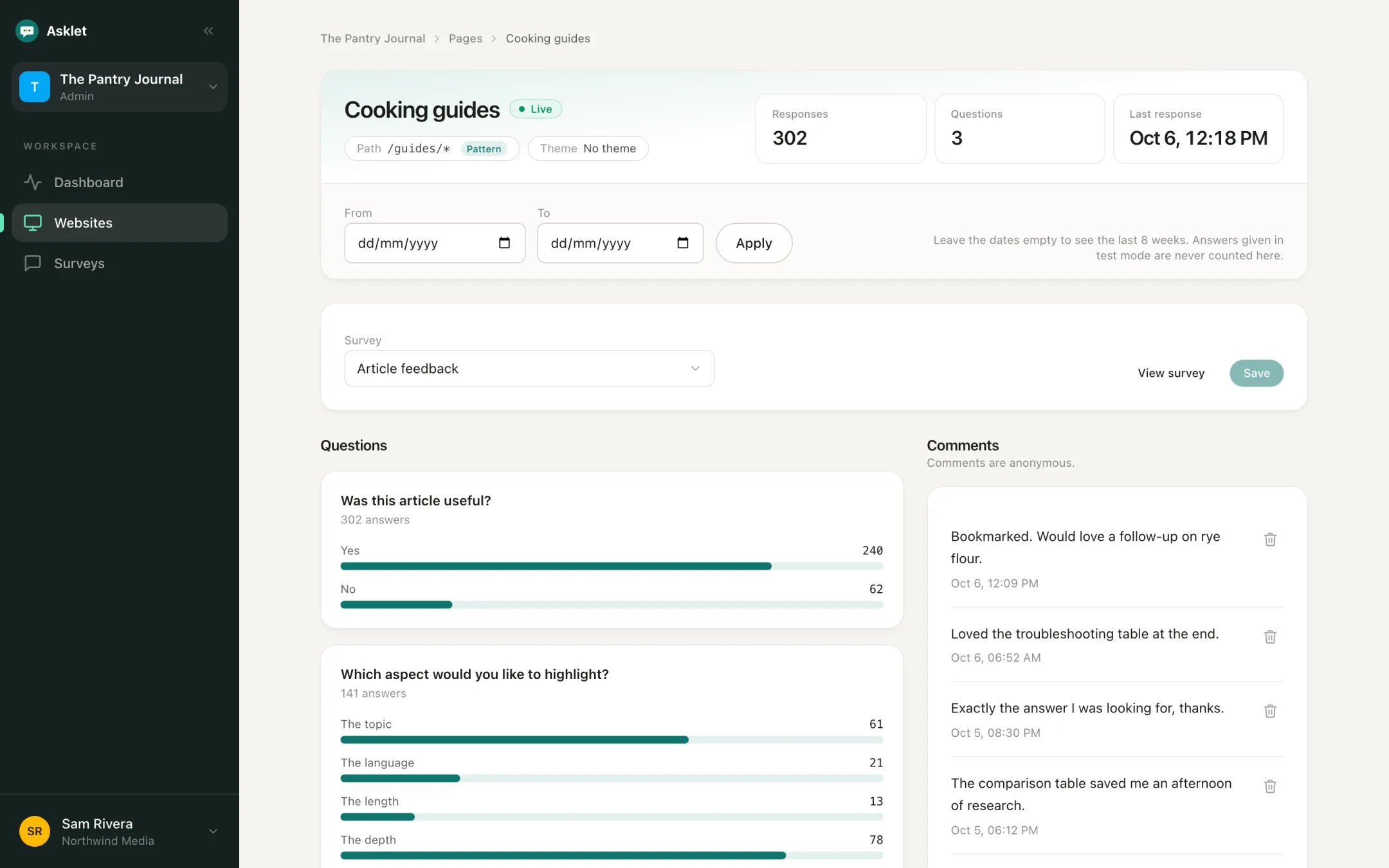
Nothing loads until someone opens the tab
The form is an iframe that only loads when someone opens the tab, so it adds nothing to your page load.
The code uses real buttons with labels and closes with Escape. The closed drawer stays out of the tab order, and the slide is skipped for people who turned on "reduce motion".
No cookie banner for your feedback tab
Feedback buttons that come with an analytics suite often load a tracking script that sets cookies, which means asking for consent first.
The Asklet widget sets no cookies, uses no tracking identifiers and stores no IP addresses with answers, so it needs no consent banner. Answers are anonymous, and emails or phone numbers typed into comments are removed before they are saved.
Works wherever you can paste HTML
The code is plain HTML, CSS and a few lines of JavaScript, so it works on WordPress, Ghost, Webflow, Framer and custom sites. Paste it once in the site template or footer and every page gets the tab.
Common questions
What is a website feedback button?
A button or tab that stays on screen while visitors browse and opens a short feedback form when clicked. Anyone can tell you what they think of the page they are on without leaving it.
Can I put the feedback tab on the left side?
Yes. The code is yours to edit: swap right for left in the tab and drawer styles, then flip the rounded corners and the direction of the slide.
Can the tab match my brand colours?
Yes. Change the tab colour in its CSS, and set the colours, texts and font of the form itself under Appearance for each website.
Will a feedback button slow my site down?
No. The form is an iframe that only loads when a visitor opens it, and the tab itself is a few lines of HTML and CSS.
Can different pages show different questions?
Yes. Add a page with a path or pattern such as /docs/** and give it its own survey. Pages that match none show the website's default survey.
Is there a free plan?
Yes. The Free plan covers one website, 10 live pages and 100 responses a month, and no card is needed.
Related
Get your first answers today.
Set-up takes a few minutes, and the free plan covers one website or app.
Start freeFree plan, no card needed.