Customer feedback tool
A customer feedback tool that asks on the page
Asklet puts a short question on the pages your customers already use: the order confirmation page, a help article, the end of onboarding, the pricing page. They answer in one tap, without an account or an email address, and you see the answers for each page, so you know which step to fix.
Reader feedback
This is the real widget - try it. Nothing is sent from this page.
How it works with Asklet
-
Build a short survey
Start from the Net Promoter Score template, or add questions from the question bank: a 1 to 5 rating for CSAT, a seven-option choice list from Very difficult to Very easy for CES, Yes / No and free text.
-
Paste one snippet
The snippet is a single iframe. Put it in your site or app template once, inline at the end of the content, in a side tab or as a slide-in.
-
Point each survey at the right pages
Patterns such as /checkout/thank-you, /help/** or /app/projects/*/settings decide which survey each page shows. New pages start in draft, so you can try them on your live site first.
-
Read the answers per page
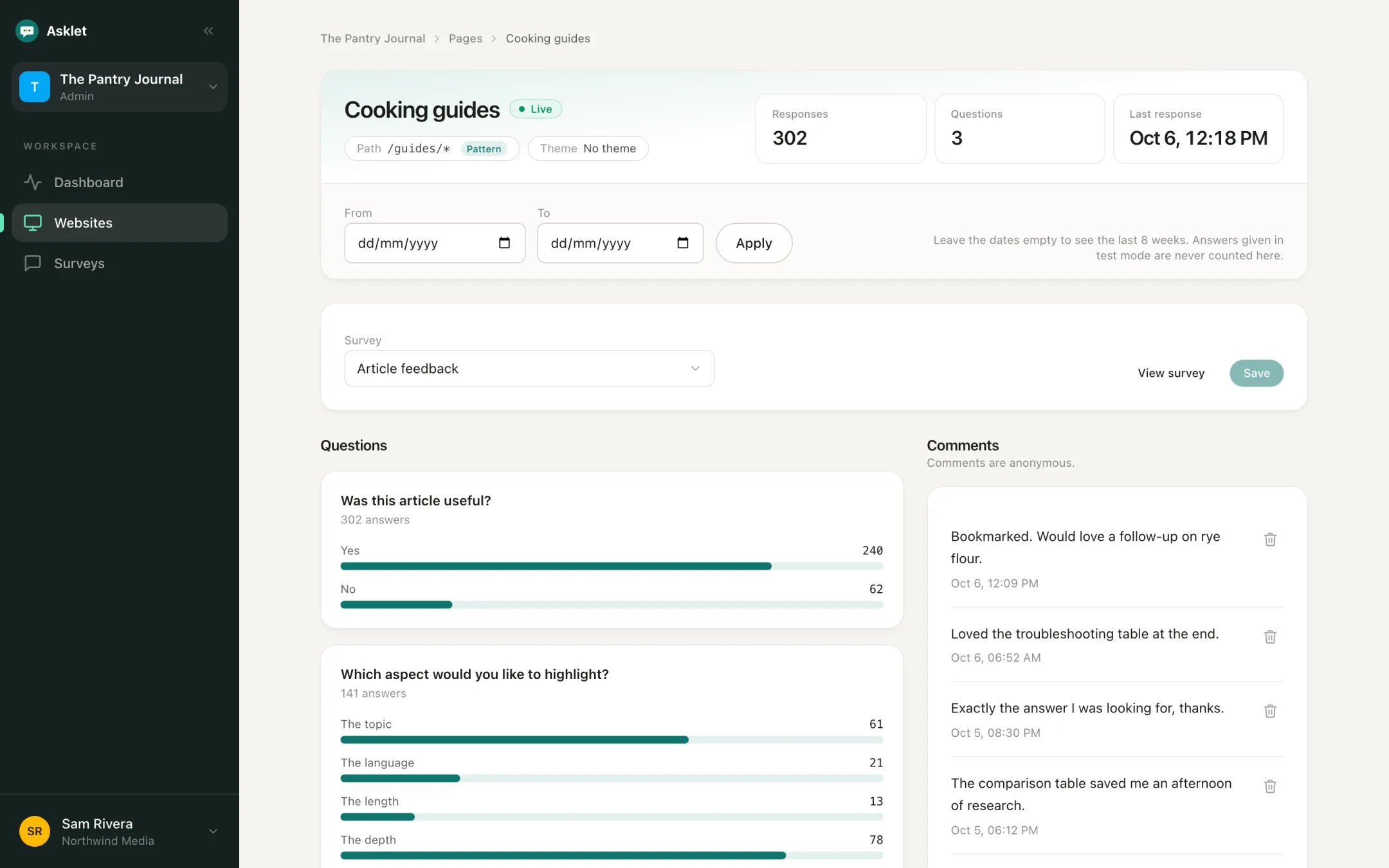
Each answer keeps the path it was given on. See which help article, checkout step or screen gets the low scores, with the comments next to the numbers.
Where to ask your customers
Ask at the moment the experience happens. One snippet covers every page, and each part of the site can ask its own question.
After checkout or sign-up
A CSAT or CES question on the confirmation page, while the order or sign-up is still fresh. Add "What almost stopped you?" to hear about the friction that nearly lost the sale.
Help centre and docs
"Did this page answer your question?" on every help article shows which ones send customers to support.
Read the use caseInside your web app
Ask about a feature on the screen where it is used, or a CES question at the end of onboarding. No SDK to install.
Read the use casePricing and landing pages
Ask visitors who have not bought yet what is stopping them. Their answers are the objections your page needs to answer.
Read the use caseNPS for the whole relationship
Run the NPS question on your site or in your app, and see the score for each page as well as overall.
Read the use caseCustomer feedback questions to start with
One rating question for the moment you care about, then an optional comment. Every question here can be built from the question bank.
- How satisfied were you with your order? Rating 1 to 5 (CSAT) Order confirmation page
- How easy was it to set up your account? Choice, 7 options (CES) End of onboarding
- Did this page answer your question? Yes / No Help articles
- What almost stopped you from ordering today? Free text Order confirmation page
- Is anything stopping you from signing up today? Free text Pricing page
- How likely are you to recommend us to a friend or colleague? NPS Whole site or app
- What is the main reason for your score? Free text After NPS
Feedback tied to the page it is about
An email survey tells you a customer is unhappy, not where. On the page, every answer is stored with the path it was given on, so a low score points at a checkout step, a help article or a screen.
A pattern such as /help/** adds up a whole section and still lists the pages the answers came from. Set a date range to compare the answers before and after you changed something.
CSAT, CES and NPS from one question bank
Questions live in a shared bank and surveys are built from them, so the same CSAT question can run on checkout and on support pages while you compare the results.
- CSAT: a 1 to 5 rating after a purchase or a support conversation
- CES: a seven-option choice list, from Very difficult to Very easy, after a task such as setup or checkout
- NPS: the 0 to 10 recommendation question, with promoters, passives and detractors in the results
- Yes / No, choice lists and free text for everything else
No cookies, no consent banner, no personal data
Customers answer without signing in or leaving an email address. The widget sets no cookies, uses no tracking identifiers and stores no IP addresses with answers, so it needs no consent banner under GDPR.
Emails and phone numbers that customers type into comments are removed before they are saved. Counts always show, and percentages wait until a page has enough answers, so a few early answers never look like a trend.
What it does not do
Asklet asks short questions on your website and web app. It does not send email surveys, record sessions, collect public reviews or link answers to a named customer. If you need those, keep your email tool, help desk or review platform for them and use Asklet for the questions that belong on the page.
Works with the site you already have
The snippet is plain HTML, so it works on WordPress, Webflow, Framer, custom sites and web apps built with React, Vue or Svelte. The iframe loads lazily and adds no script to your page.
Common questions
What is a customer feedback tool?
Software that asks customers what they think and helps you read the answers. Some send surveys by email, some collect feature requests on a board, and some, like this one, ask a short question on your website or in your web app.
Can I measure CSAT, CES and NPS?
Yes. Use a 1 to 5 rating for CSAT, a seven-option choice list for CES and the NPS question type for NPS. Each can run on the pages you choose. Results count the answers per option, so you can put the CES counts into our free CES calculator.
Can I tie an answer to a specific customer?
No. Answers are anonymous by design, and emails or phone numbers typed into comments are removed. Use it for honest answers from many customers, and your help desk or an interview to follow up with one person.
Do customers need an account or to accept cookies?
No. Nobody signs in, and the widget sets no cookies, so there is no consent banner.
Can I ask an AI assistant about the feedback?
Yes, on the Pro plan. A read-only MCP server lets assistants such as Claude, Cursor or VS Code read your surveys, results and comments.
Is there a free plan?
Yes. The Free plan covers one website, 10 live pages and 100 responses a month, and no card is needed.
Related
Get your first answers today.
Set-up takes a few minutes, and the free plan covers one website or app.
Start freeFree plan, no card needed.