Micro-surveys
Micro-surveys for content sites
Ask readers one to three short questions on the page they are reading, answered in a few seconds. Asklet puts them on your content with one snippet and picks the survey each page shows from its address, so guides, reviews and news can each ask their own.
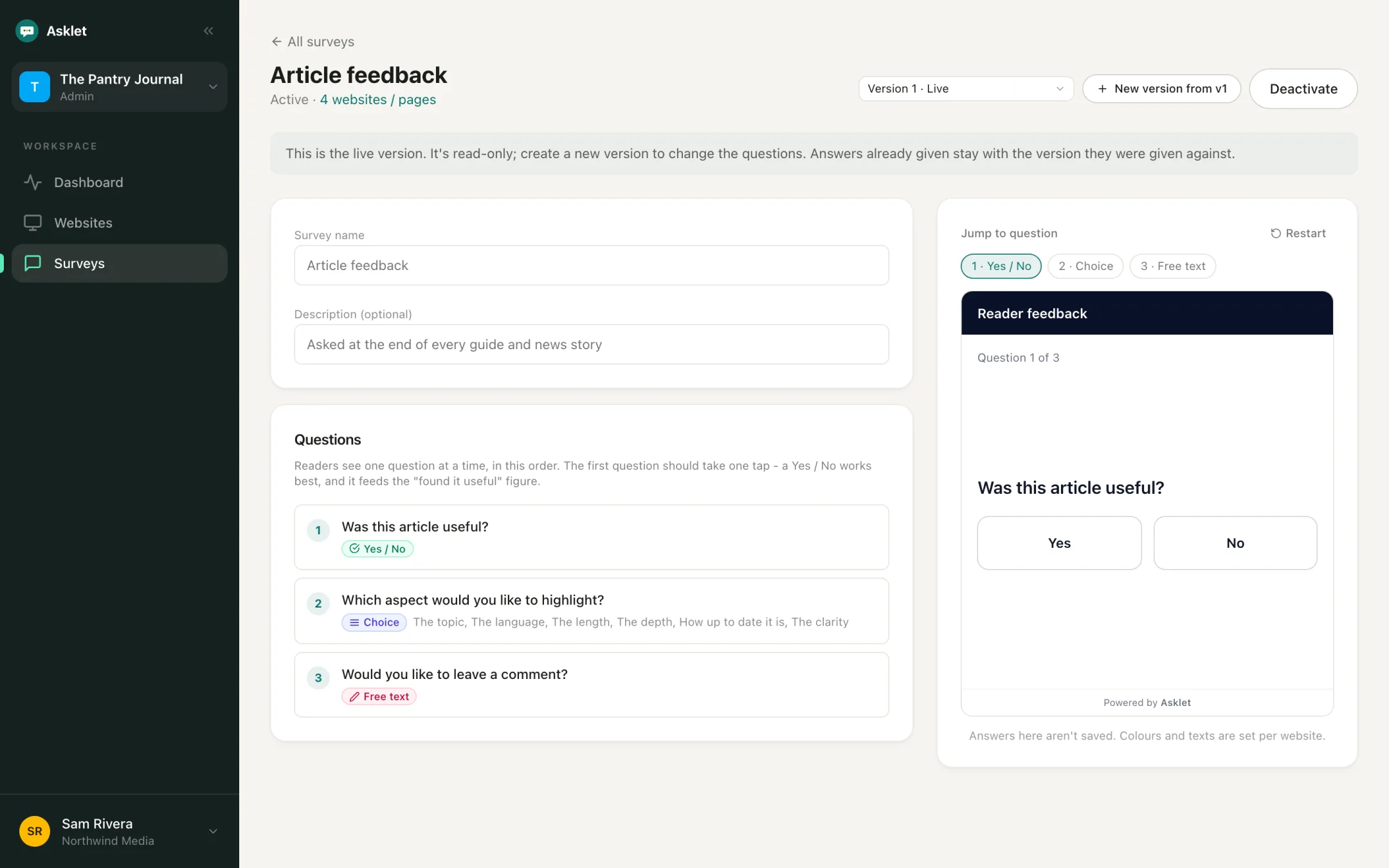
How it works with Asklet
-
Start from a template or one question
Use the Article feedback or Net Promoter Score template, or write your own from seven question types: Yes / No, star rating, NPS, percentage, range, multiple choice and free text.
-
Paste one snippet in your page template
The snippet is a single iframe that loads only when a reader scrolls near it. Put it after the content, or in a side tab or slide-in that stays on screen.
-
Choose which pages ask what
Point patterns such as /reviews/* or /guides/** at different surveys. Every other page shows the website's default survey. New pages start in draft, so you can try them on your live site first.
-
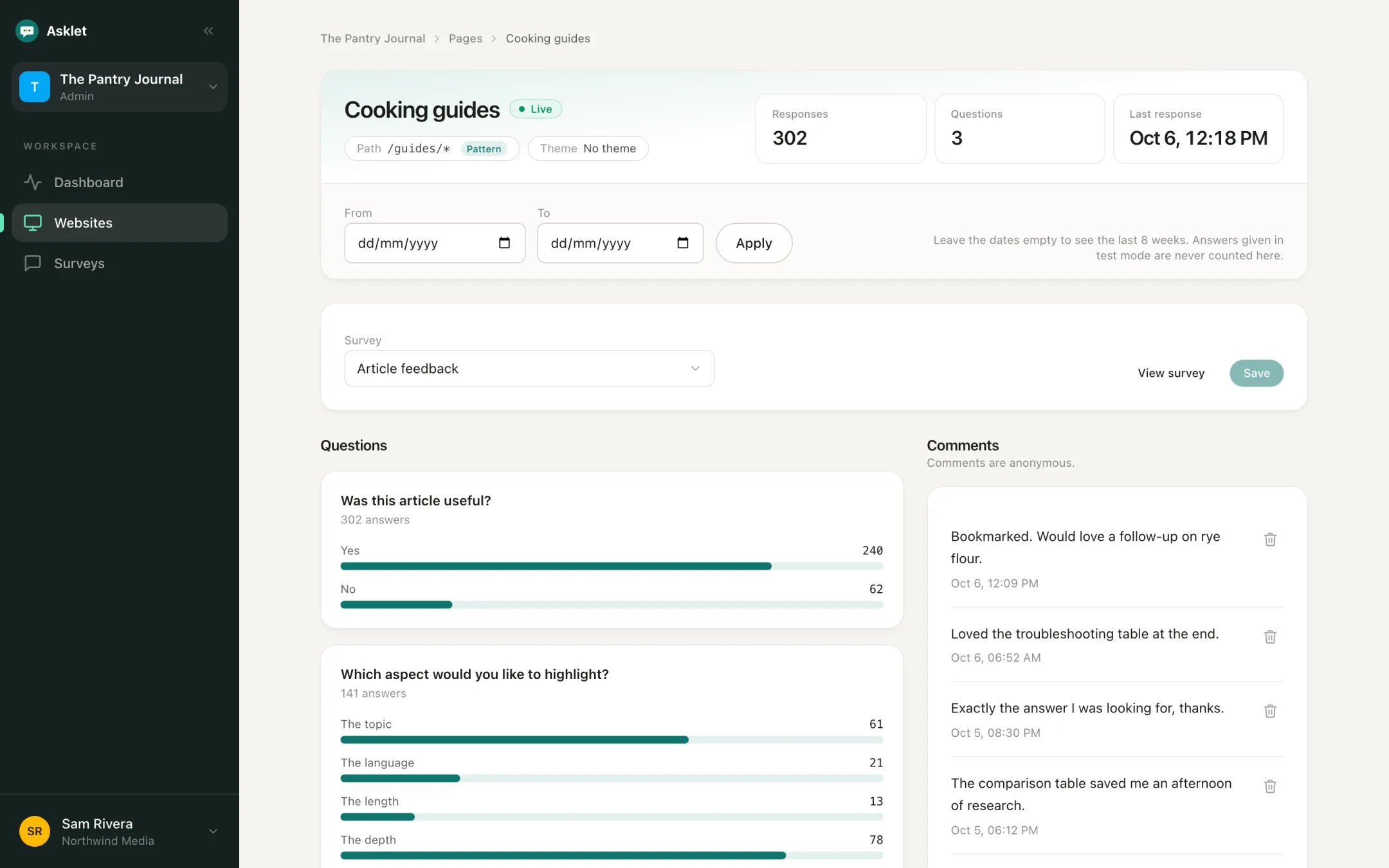
Read the answers per page
Each answer keeps the path it was given on. Compare pages and sections, and read the comments next to the numbers.
Micro-surveys that work on content sites
Each kind of micro-survey answers one question about your content. Run different ones in different sections.
Helpfulness check
"Was this useful?" with Yes and No at the end of every article gives you one figure per article to compare.
Read the use caseContent rating
A 1 to 5 star rating on reviews and long reads shows how strongly readers feel, not only whether they liked it.
Topic vote
A multiple choice question with up to 12 topics lets readers pick what you should cover next, more than one if you allow it.
Depth check
A percentage slider asking "How much of this was new to you?" shows whether an explainer pitched its depth right.
Docs check
"Did this page answer your question?" on every help page shows which ones send readers to support.
Read the use caseRecommendation score
The 0 to 10 NPS question on your newsletter or about page, with promoters, passives and detractors per page.
Read the use caseMicro-survey questions to start with
Put the quickest question first. Every reader sees one question at a time, so the first one gets the most answers.
- Was this useful? Yes / No Any article
- How would you rate this review? Star rating Reviews
- How much of this was new to you? Percentage Explainers and long reads
- Which topic should we cover next? Multiple choice Popular articles
- Is anything on this page out of date? Yes / No Evergreen guides
- What would make this better? Free text Follow-up
Why readers answer micro-surveys
The question is about the page in front of them, it appears when they finish reading, and the first answer takes one tap. Nobody signs in or gives an email address.
- Readers see one question at a time
- You choose whether readers can skip a question
- Progress shows as text, a bar or not at all
- Colours, texts and font match your site
Keep them short
A survey can have up to 3 questions on Free, 6 on Starter and 10 on Pro. On content pages, one to three is usually right: one that tells you whether the page worked, one that tells you why, and an optional comment.
No cookie banner needed
The widget sets no cookies and uses no tracking identifiers or fingerprinting, and it stores no IP addresses, so it does not need a consent banner. Emails and phone numbers typed into free-text answers are removed before they are saved.
From answers to changes
Results show per page, per path and per theme, with counts until a page has enough answers for percentages to mean something.
- Update the pages with the most No answers first
- Add what readers say is missing
- Plan new articles from the topics readers pick
- Set a date range to compare before and after a change
Common questions
What is a micro-survey?
A micro-survey is a survey of one to three short questions shown on the page, answered in a few seconds. On a content site it usually asks whether the page was useful and why.
How many questions should a micro-survey have?
One to three. Start with a one-tap question such as Yes / No, then add a follow-up or an optional comment.
Where should a micro-survey go on the page?
At the end of the content, where readers have just finished. On long pages, a side tab or slide-in also reaches readers who stop partway.
Do micro-surveys need cookie consent?
Not with Asklet. The widget sets no cookies and uses no tracking identifiers, so there is nothing to consent to.
Is there a free plan?
Yes. The Free plan covers one website, 10 live pages and 100 responses a month, and no card is needed.
Related
Get your first answers today.
Set-up takes a few minutes, and the free plan covers one website or app.
Start freeFree plan, no card needed.